Cloud Render API
Render images, GIFs, PDFs, and MP4 videos from Polotno JSON in the cloud
What is Cloud Render API?
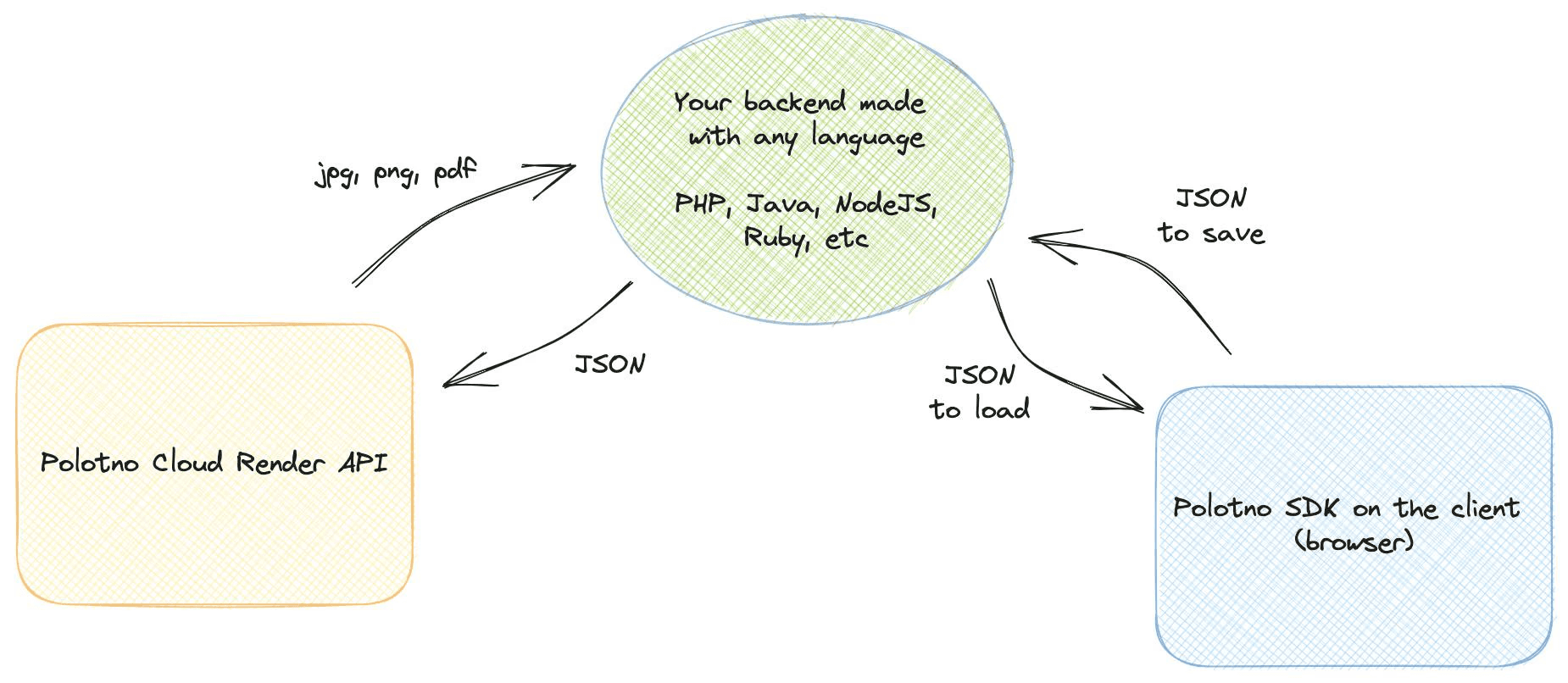
Using Polotno SDK, you can generate images directly on the client. But sometimes you need to generate images on the backend. For example, if you want to generate a 1,000 images with different text on it or if you want to simply offload rendering work from the client.
Polotno Cloud Render API is a managed rendering service that allows you to generate images, PDFs, and videos in the cloud without any backend infrastructure. You can use it to generate exports on the fly or to generate them in bulk for automated design workflows.
Pricing
Cloud Render API is available for any subscribers at an additional price.
Before you start
(!) Important: all finished jobs will expire in 1 week. Such jobs will be deleted from the database and all render artifacts (images, PDF, videos, etc) are removed from file storage. Make sure to download the export result. If you need a persistent file store, please contact us.
What does it look like?
1. Create render job
Send a POST request to schedule a rendering job.
const req = await fetch('https://api.polotno.com/api/renders?KEY=YOUR_API_KEY', {
  method: 'POST',
  headers: {
    // it is important to set a json content type
    'Content-Type': 'application/json',
  },
  body: JSON.stringify({
    // polotno json from store.toJSON()
    design: json,
    // here you can pass other render options
    pixelRatio: 1,
    // see below for full details of options
  }),
});

const job = await req.json();

console.log(job);
It will return a JSON like this:
{
  "id": "fp1f2rtva",
  "status": "scheduled",
  "output": null,
  "error": "",
  "created_at": "2024-05-15T01:41:55.913628+00:00",
  "completed_at": null,
  "started_at": null,
  "updated_at": null,
  "progress": 0,
  "logs": ""
}
Check render job status
// replace jobId with real id of the job
const req = await fetch(`https://api.polotno.com/api/renders/jobId?KEY=YOUR_API_KEY`);
const job = await req.json();

console.log(job);

if (job.status === 'done') {
  console.log(job.output); // link to file, valid only for 7 days after job complete
}
The response also includes the inputs the job was created with: options (render options) and design (a link to the design JSON): useful for debugging a specific render.
Options
- design: json (required): data from Polotno export
store.toJSON(). You can generate such JSON on the fly on your backend (e.g. replace text dynamically). - format: string: file format of generated result. One of:
png(default),jpeg,pdf,gif,mp4. - webhook: string: URL to receive HTTP POST notifications with the full job payload.
- pixelRatio: number: quality modifier.
0.5reduces width/height by 2; values > 1 increase quality (and size). - ignoreBackground: boolean: remove page background on export (default: false).
- dpiMetadata: string: control DPI metadata embedding for images. One of:
auto(default),always,never. - includeBleed: boolean: render bleed areas (default: false).
- skipFontError: boolean: continue if font loading fails (default: false).
- skipImageError: boolean: continue if image loading fails (default: false).
- textOverflow: string: overwrite text overflow logic. Default:
change-font-size. Other values:resize,ellipsis. - vector: boolean: make
pdfin vector format (selectable text). Alpha feature (default: false). - pdfx: string: with
vector: true, emit print-ready PDF/X. One of:x-4(preferred),x-1a(legacy, flattens transparent pages). The embedded ICC printing condition comes fromcolor.profile. - color: object: control color space and profile.
space:RGB(default) orCMYK.profile:FOGRA39(default for CMYK) orUSWebCoatedSWOP.
{
  "color": {
    "space": "CMYK",
    "profile": "FOGRA39"
  }
}
See a list of created jobs
List render jobs created with your API key. Supports filtering, ordering, and column selection, so you can use it for debugging and analytics: error monitoring, failure analysis, latency tracking.
const req = await fetch('https://api.polotno.com/api/renders/list?KEY=YOUR_API_KEY&page=1&per_page=100');
const data = await req.json();

console.log(data.renders); // array of jobs
console.log(data.total_count); // total number of jobs matching the filters
It will return a JSON like this:
{
  "renders": [
    {
      "id": "fp1f2rtva",
      "status": "done",
      "output": "https://.../export.png",
      "error": null,
      "created_at": "2026-07-15T01:41:55.913628+00:00",
      "completed_at": "2026-07-15T01:42:01.100000+00:00",
      "started_at": "2026-07-15T01:41:56.200000+00:00",
      "updated_at": "2026-07-15T01:42:01.100000+00:00",
      "progress": 100,
      "logs": "",
      "webhook": null,
      "options": { "format": "png", "pixelRatio": 1 },
      "design": "https://.../cloud-renders/2026/07/15/fp1f2rtva.json"
    }
  ],
  "page": 1,
  "per_page": 100,
  "total_count": 1234,
  "total_pages": 13
}
Every job includes the inputs it was created with: options (the render options you passed) and design (a link to the design JSON), which makes it easy to reproduce and debug a specific render.
Query parameters
- page: number: page number, starting from 1 (default: 1).
- per_page: number: jobs per page, up to 1000 (default: 100).
- status: string: return only jobs with these statuses. Comma-separated list of:
scheduled,progress,done,error. Example:status=errororstatus=scheduled,progress. - created_after: string: ISO 8601 date. Return only jobs created strictly after this time.
- created_before: string: ISO 8601 date. Return only jobs created before this time.
- order: string: sort by creation time:
desc(newest first, default) orasc. - fields: string: comma-separated list of fields to return, for lighter responses. Any of:
id,status,output,error,created_at,completed_at,started_at,updated_at,progress,logs,webhook,options,design. By default all fields are returned.
Invalid parameters return a 400 response with an explanation.
Common use cases
Count and inspect failed renders for the last day:
const since = new Date(Date.now() - 24 * 60 * 60 * 1000).toISOString();
const req = await fetch(
  `https://api.polotno.com/api/renders/list?KEY=YOUR_API_KEY&status=error&created_after=${since}&fields=id,error,created_at`
);
const { renders, total_count } = await req.json();
console.log(`${total_count} failed renders in the last 24h`);
Fetch lightweight data for latency analysis (compute durations as completed_at - created_at):
const req = await fetch(
  'https://api.polotno.com/api/renders/list?KEY=YOUR_API_KEY&status=done&fields=created_at,started_at,completed_at&per_page=1000'
);
Iterate over a large history without pagination limits: use created_after as a cursor (it is exclusive, so pass the created_at of the last job you have seen):
let cursor = '2026-07-01T00:00:00Z';
while (true) {
  const req = await fetch(
    `https://api.polotno.com/api/renders/list?KEY=YOUR_API_KEY&order=asc&created_after=${cursor}&per_page=1000`
  );
  const { renders } = await req.json();
  if (!renders.length) break;
  // process renders...
  cursor = renders[renders.length - 1].created_at;
}
Limits
- The list API is limited to 1000 requests per day per API key. When exceeded, it returns
429. - Offset pagination is capped:
page * per_pagemust not exceed 100 000. For deeper history use thecreated_aftercursor pattern above.
Synchronous request
Use Prefer: 'wait' for quick renders (e.g., image). The request may still return before completion for long renders (e.g., video).
const req = await fetch('https://api.polotno.com/api/renders?KEY=YOUR_API_KEY', {
  method: 'POST',
  headers: {
    'Content-Type': 'application/json',
    Prefer: 'wait'
  },
  body: JSON.stringify({
    design: json,
    pixelRatio: 1,
  }),
});

const job = await req.json();

if (job.status === 'error' || job.status === 'done') {
  // handle result
} else {
  // job may still be running; poll status
}
Related
Product overview and pricing for this API: Cloud Render API. For the design side of it, see PDF generation: producing documents from a template plus a data row.
Try the conversions client-side before you wire up a render job:
- PDF to JSON: see the exact schema the API expects as
design. - PDF to PNG and PDF to JPG: the raster targets.
- PDF preflight: check a print-ready file before sending it on.