
A JS image editor is a browser-based editing surface written in JavaScript that runs inside your web app. No desktop software, no server round trips. Users crop, mask, filter, and add text on a <canvas>, and your app gets the edited file back as PNG, JPEG, or PDF.
Most teams that ship one don't write it from scratch. The hard parts (high-DPI rendering, multi-selection transforms, undo history, font loading, export) take quarters of engineering, not sprints. Polotno SDK gives you those parts as composable React components on top of a plain JavaScript store, so you can wire up an editor in an afternoon and spend the rest of the week on the things that actually differentiate your product.
JS image editor demo
“In just a few hours, I customized Polotno, picked the functions I needed, and from then on concentrated on building my business”

Sven Speer
Founder @ Coamaker
What "JS image editor" actually means in 2026
The label covers a wide range. At one end, a single-purpose cropper that hands back a Blob. At the other, a full design surface with layers, fonts, filters, and templates. The shared traits:
- Runs client-side. Edits happen on the user's machine via Canvas, WebGL, or both. No image upload, no server CPU, no privacy ask.
- Real-time feedback. Brightness sliders, crop handles, and text resizing update at 60 fps because there's no network in the loop.
- Composable. Cropping, filters, and text overlays are separate modules you can include or strip out. You're not stuck with someone else's UX shell.
- Pluggable into any framework. A pure-JS core works in React, Vue, Svelte, or plain HTML. Polotno ships React components and a framework-agnostic store; the Vue integration is a thin wrapper.
A 30-line starter
Here is the minimum to render an editor with a sidebar, toolbar, and exportable canvas:
import { PolotnoContainer, SidePanelWrap, WorkspaceWrap } from 'polotno';
import { Toolbar } from 'polotno/toolbar/toolbar';
import { SidePanel } from 'polotno/side-panel';
import { Workspace } from 'polotno/canvas/workspace';
import { createStore } from 'polotno/model/store';
import 'polotno/ui.css';

const store = createStore({ key: 'YOUR_API_KEY', showCredit: true });
store.addPage();

export const Editor = () => (
  <PolotnoContainer style={{ height: '90vh' }}>
    <SidePanelWrap><SidePanel store={store} /></SidePanelWrap>
    <WorkspaceWrap>
      <Toolbar store={store} />
      <Workspace store={store} />
    </WorkspaceWrap>
  </PolotnoContainer>
);
That's a working editor with templates, photo search, fonts, undo, and PNG export. Everything else (cropping a user's product photo, replacing colors in an SVG logo, applying a brand-safe filter) is one method call on store or an element.
“Polotno enabled us to give our users Canva-like abilities which for a while was our top requested feature”

Josiah Coad
Founder @ Marky
The features users actually ask for
Five capabilities show up on every roadmap we see. Each maps to a small surface in Polotno:
- Non-destructive crop. Drag the crop handles in the UI or set
cropX,cropY,cropWidth,cropHeight(each 0–1) on an image element. The original pixels stay intact, so users can reset. - Adjustments and filters.
brightnessfrom-1to1,blurRadiusin pixels, plussepiaEnabledandgrayscaleEnabledflags. Filter intensity is a single number, easy to bind to a slider. - Masks and shapes. Set
clipSrcon an image to clip it to any SVG path: circles for avatars, hearts for greeting cards, custom brand shapes. - Text overlays. Add a text element with
addElement({ type: 'text', text: 'Hello', x: 50, y: 50 }). Custom fonts, multi-line, alignment, and stroke all work out of the box. - Export.
store.toDataURL()for PNG,store.toBlob()for upload,store.saveAsPDF()for print. Resolution and DPI are arguments, not separate code paths.
These five capabilities cover roughly 80% of what teams build. The other 20% (custom side panels, branded toolbars, locked templates) is what <SidePanel sections={...}> and the user roles API are for.
Where it pays off
The editor isn't the product; what users do with it is. A few patterns we see most often:
- E-commerce and print-on-demand. Customers personalize a t-shirt or mug in the listing page, see the live preview on the product mockup, and the order ships with the exact PNG they designed. No "we'll mock it up and email you" loop.
- Marketing and creator tools. Users generate social posts, ad variants, and thumbnails inside the app where their brand assets already live, instead of round-tripping through Canva.
- Social and UGC platforms. Profile-image cropping, story stickers, watermark overlays. Small surfaces, but the difference between a polished feed and a janky one.
- Education and document tools. Annotate screenshots, blur sensitive regions, drop in arrows and callouts before sharing or printing.
Across these, the win is the same: keep the user inside your product, capture the design data (not just a flat image), and reuse it later for variants, reprints, or analytics.
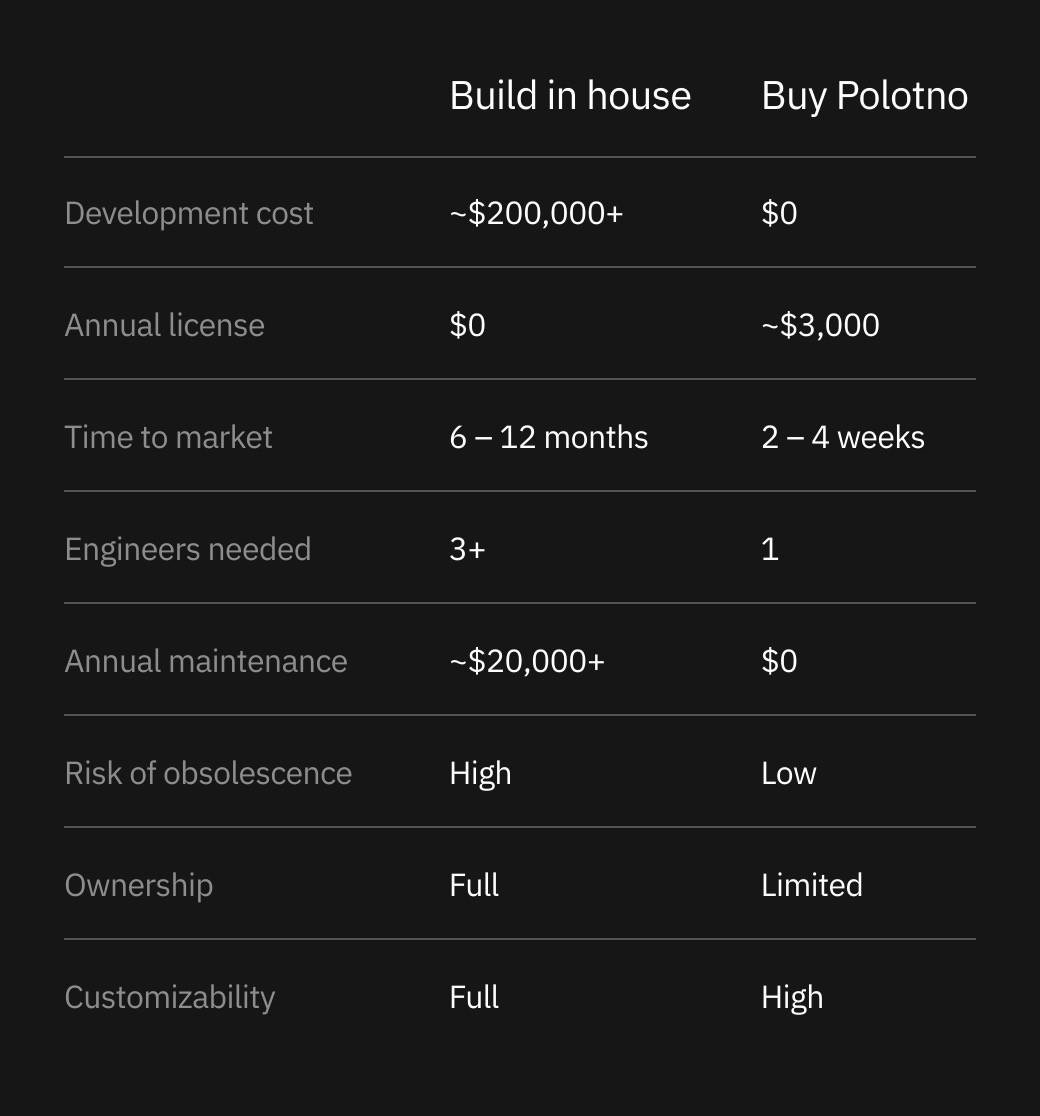
Build it yourself, or ship next month
The honest math on a from-scratch editor: a senior engineer can stand up cropping and basic text in two weeks. Adding undo/redo, multi-select transforms, font loading, image filters with WebGL fallback, and reliable PNG/PDF export takes six months and never really stops. Browsers change, fonts change, customer requests change.
Polotno collapses that to a license fee and a day of integration. You keep full control of the UI shell (it's your React tree), you own the design JSON (it's a documented schema), and you can self-host the rendering if you ever need to walk away. That's the part most "buy" options don't give you.




