Dynamic Template Variables
Variable data printing (VDP), mail merge and personalized batches from one template, by replacing placeholders in the design JSON with data
Generate many designs from one template: personalized images, variable data printing (VDP), mail merge and other batches. A Polotno design is plain JSON in an open format, so a template is a design with placeholders in it, and each copy is the same JSON with the placeholders replaced by data: one row of a CSV file or a database per copy. Render every copy in the browser, on your server with polotno-node, or with the Cloud Render API, or send it as email HTML.
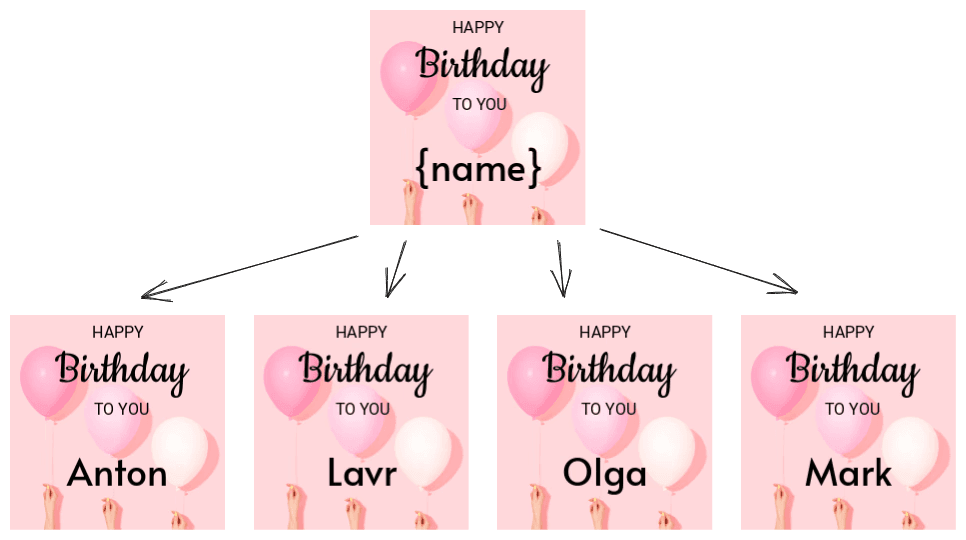
You choose the placeholder syntax and the UI for it. The workflow:
- Create a design with some variables in it.
- Export design as JSON.
- Save this JSON to the database/backend.
- When you need to create a new design or export it, load JSON from the database and replace variables with real data.
- Load or export the generated JSON.
For a complete print pipeline, see how to build a production VDP pipeline and the direct mail donor postcards demo.
Every design in Polotno can be represented as JSON via store.toJSON() function. Now it is up to you to decide how to create variations of this JSON. Here are several examples.
Simple text replacement
As a part of your application convention you can use {variable} syntax to mark places where you want to replace text. Users of the editor may manually type this text or you can provide some UI for it.
store.activePage.addElement({
  type: 'text',
  // lets use name variable
  text: 'Hello {name}!',
});
When you want to generate a new design or export it, you can replace {name} with a real name. Replace text fields on a copy of the design. This preserves the original template and handles repeated tokens inside groups. Escape names before inserting them into rich text so markup and entities remain literal. The callback also preserves replacement characters such as $&. Put tokens in text content, not inside HTML tags or attributes. Here is backend pseudocode:
function replaceName(design: any, name: string) {
const result = structuredClone(design);
const text = name.replaceAll('&', '&').replaceAll('<', '<').replaceAll('>', '>');
const visit = (node: any) => {
if (node.type === 'text') {
node.text = node.text.replaceAll('{name}', () => text);
}
node.children?.forEach(visit);
};
result.pages.forEach(visit);
return result;
}
const json = loadJSONFromDatabase();
const names = ['John', 'Mike', 'Anna'];
for (const name of names) {
const newJson = replaceName(json, name);
await convertJSONToImage(newJson);
}Image replacement
You can set up a similar workflow for images. To mark some images as variable you can use custom attribute of image element. It is a free-form object that you can use to store any data. You can make your own UI where users can change this data.
store.activePage.addElement({
  type: 'image',
  src: 'https://example.com/placeholder.png',
  custom: {
    // lets use avatar variable
    variable: 'avatar',
  },
});
Then on the backend you can replace src of this image with a real image URL based on information from the custom attribute.
// util function to handle deep traversal of json
const forEveryChild = (node: any, cb: (n: any) => void) => {
  if (node.children) {
    node.children.forEach((child: any) => {
      cb(child);
      forEveryChild(child, cb);
    });
  }
};

const json = loadJSONFromDatabase();
const avatars = [
  'https://example.com/avatar1.png',
  'https://example.com/avatar2.png',
];
// do bulk export
for (const avatar of avatars) {
  const newJson = structuredClone(json);
  // find all avatar images in this copy
  newJson.pages.forEach((page: any) => {
    forEveryChild(page, (child) => {
      if (child.type === 'image' && child.custom?.variable === 'avatar') {
        child.src = avatar;
      }
    });
  });
  // export this variation
  await convertJSONToImage(newJson);
}
The demo below shows how to replace text in the design. The demo specifies only one variable {name} but you can add more variables according to your application logic.
Click the "Preview" button to see how generation works.