
Design systems break down fastest when templates leave the hands of designers and move into self-serve workflows used by marketers, franchise teams, or end customers. Flexibility without guardrails becomes a liability. Layouts shift, brand elements drift, legal copy disappears, and exports become inconsistent across channels.
Brand locking fixes this by turning brand and production requirements into enforceable rules. Instead of relying on training or manual review, you define exactly what users can and cannot change across layout, content, styling, and assets. The goal is not “less editing.” The goal is predictable output: the same template version and the same input data should produce the same result every time.
This guide explains how to implement brand locking in a template editor and rendering pipeline. It stays tool-agnostic and includes Polotno SDK examples where Polotno is the embedded design editor layer. If you are new to Polotno, start with the Polotno SDK docs overview.
What brand locking means in template systems
Brand locking is enforcing constraints in a template system so users can personalize content without violating brand rules or breaking layouts.
A scalable template workflow is always balancing two forces:
- Users need enough freedom to personalize content, like names, images, offers, and local details.
- The system must guarantee outputs remain visually correct, brand-compliant, and safe to export.
Brand locking resolves that tension by making invalid states hard to create in the editor and impossible to save or render.
The minimum locking model (define this once)
Before you implement anything, define a consistent model that your editor, API, validation, and renderer will all agree on.
A practical minimal schema is:
- Editability
locked: cannot be moved, resized, deleted, rotated, or restyled.contentOnly: content can change, but geometry and styling are fixed.bounded: user can transform within declared bounds (common for image placeholders).
- Required
required: truemeans the node must exist in every saved template state and every render.
- Style policy
styleTokenselects a controlled style preset.allowStyleOverrides: falseprevents “editor-only overrides” from leaking into production.
This is more reliable than mixing locked, editable, and ad-hoc flags without a single source of truth.
What problem brand locking solves
Without enforcement, template systems fail in predictable ways:
- Text overflows, clips, or becomes unreadable.
- Elements become misaligned or drift outside safe areas.
- Unapproved fonts and colors appear.
- Critical content like disclaimers gets removed.
- Preview and export drift across channels due to inconsistent rendering rules.
Teams often compensate with manual review. That does not scale. Brand locking reduces review burden by making correct output the default and rejecting invalid states at save and render time.
What counts as brand rules (four layers)
Brand rules are not only “colors and fonts.” In production workflows they span four layers, and each layer is enforced differently.
Structural constraints (layout integrity)
Structural constraints protect the layout itself. They prevent changes that collapse hierarchy or move critical elements outside safe areas.
Examples:
- Locked element positions
- Restricted resizing
- Safe area boundaries
- Print-safe margins and bleed boundaries
Content constraints (what is editable)
Content constraints define the “safe editing surface.” Instead of making everything editable, you explicitly mark what is allowed.
A usable model:
- Locked elements: logos, disclaimers, backgrounds
- Content-only fields: most text fields (edit text, but not position or style)
- Bounded placeholders: images and modules with limited flexibility
Styling constraints (brand consistency)
Styling constraints prevent brand drift by removing raw styling controls from the end-user surface.
Instead of exposing hex pickers and arbitrary fonts, expose controlled choices:
- Color tokens instead of free color pickers
- Typography presets instead of arbitrary fonts
- Component variants instead of free-form layout edits
Output constraints (production safety)
Even with a strict editor UI, exports must still be valid. Print and high-volume pipelines require production constraints.
Examples:
- Bleed and safe zones
- Image resolution checks
- Font availability checks
- Export preflight rules (PDF, image, video)
The real goal: determinism
The most important outcome of brand locking is determinism: given the same template version and the same input data, your system produces the same output.
Determinism enables:
- Batch rendering
- Auditability
- Safe reruns and partial rerenders
- Debugging that does not depend on “what happened in the editor UI”
When you need brand locking (common scenarios)
Brand locking becomes essential when content creation is distributed.
Multi-tenant platforms need isolation between tenant tokens and permissions so templates can be reused without turning into one-off forks.
Franchise and field marketing needs HQ-authored master templates that local teams can personalize without introducing brand drift.
Self-serve design editors in SaaS must prevent invalid actions and reject invalid saves, because invalid states become normal at scale.
Regulated workflows need enforceable compliance requirements, like “disclaimers cannot be removed” and “minimum readable font size.”
How to implement brand locking (schema, tokens, validation, rendering)
A robust implementation enforces the same policy at four points:
- Template schema (metadata on elements)
- Editor UI (prevent invalid actions)
- Save-time validation (reject invalid states)
- Render-time validation (final line of defense)
The editor is not the source of truth. The policy is.
Step 1: Add constraint metadata to template JSON
UI-only locks are not enough. Imports, API edits, and edge cases will still break templates unless constraints are part of the persisted schema.
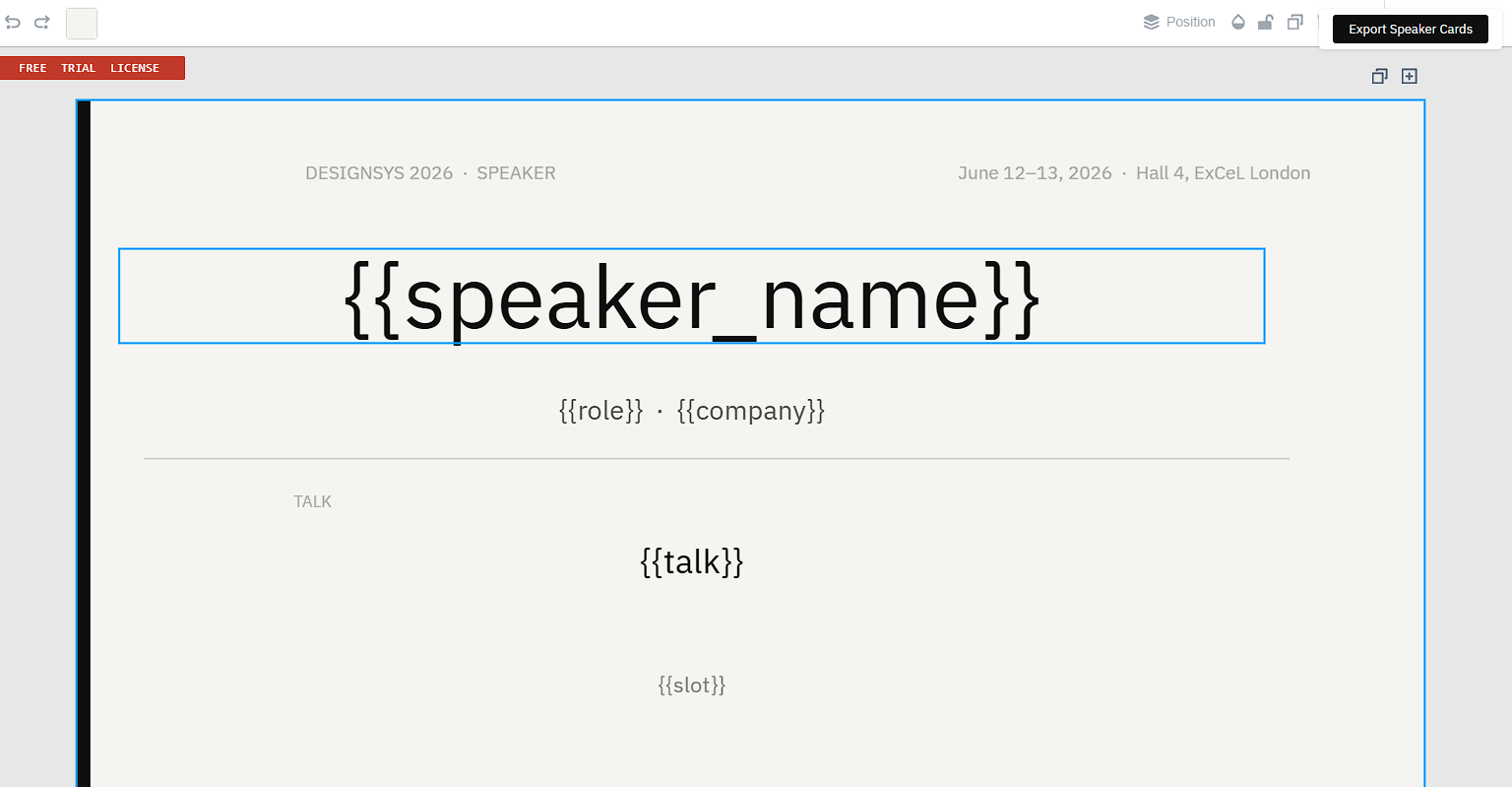
Here is a minimal pattern you can extend. The important part is that each node declares its editability and constraints, and validation treats that as policy. In Polotno, keep that policy in the element's custom field: the store saves custom as-is and drops unknown top-level keys when it loads a design.
const template = {
  width: 800,
  height: 460,
  pages: [
    {
      id: 'page-1',
      background: '#f5f4f0',
      children: [
        // Left accent bar (locked brand colour)
        {
          id: 'accent-bar',
          type: 'svg',
          x: 0,
          y: 0,
          width: 8,
          height: 460,
          src: "data:image/svg+xml,%3Csvg xmlns='http://www.w3.org/2000/svg' width='8' height='460'%3E%3Crect width='8' height='460' fill='%230f0f0f'/%3E%3C/svg%3E",
          locked: true,
          custom: { editability: 'locked' },
        },

        // Event label (locked)
        {
          id: 'event-label',
          type: 'text',
          x: 40,
          y: 36,
          width: 340,
          text: 'DESIGNSYS 2026  ·  SPEAKER',
          fontSize: 11,
          fontFamily: 'IBM Plex Sans',
          fill: '#aaaaaa',
          locked: true,
          custom: {
            editability: 'locked',
            required: true,
            styleToken: 'eventLabel',
            allowStyleOverrides: false,
          },
        },

        // Event date + venue (locked)
        {
          id: 'event-meta',
          type: 'text',
          x: 480,
          y: 36,
          width: 296,
          text: 'June 12–13, 2026  ·  Hall 4, ExCeL London',
          fontSize: 11,
          fontFamily: 'IBM Plex Sans',
          fill: '#aaaaaa',
          locked: true,
          custom: {
            editability: 'locked',
            required: true,
            styleToken: 'eventLabel',
            allowStyleOverrides: false,
          },
        },

        // Speaker name (contentOnly)
        {
          id: 'speaker-name',
          type: 'text',
          x: 40,
          y: 88,
          width: 680,
          text: '{{speakerName}}',
          fontSize: 52,
          fontFamily: 'IBM Plex Sans',
          fill: '#0f0f0f',
          lineHeight: 1.05,
          custom: {
            editability: 'contentOnly',
            styleToken: 'speakerName',
            allowStyleOverrides: false,
            constraints: {
              maxChars: 32,
              maxLines: 1,
              minFontSize: 28,
            },
          },
        },

        // Talk title (contentOnly)
        {
          id: 'talk-title',
          type: 'text',
          x: 40,
          y: 256,
          width: 600,
          text: '{{talkTitle}}',
          fontSize: 20,
          fontFamily: 'IBM Plex Sans',
          fill: '#0f0f0f',
          lineHeight: 1.3,
          custom: {
            editability: 'contentOnly',
            styleToken: 'talkTitle',
            allowStyleOverrides: false,
            constraints: {
              maxChars: 80,
              maxLines: 2,
              minFontSize: 14,
            },
          },
        },
      ],
    },
  ],
  unit: 'px',
  dpi: 72,
  schemaVersion: 2,
};
If you are implementing this on top of Polotno, also read:
- Polotno element locking API (UI constraints).
- Polotno JSON schema reference (persisted contract).
Step 2: Define brand tokens as the only styling surface
Tokens turn brand rules into a controlled configuration that can be evaluated deterministically. They also make it possible to update brand styling centrally without “manually touching every template.”
const BRAND_TOKENS = {
  colors: {
    textPrimary: '#111111',
    textSecondary: '#666666',
  },
  typography: {
    eventLabel: { fontFamily: 'IBM Plex Sans', fontSize: 11, fill: '#aaaaaa' },
    speakerName: { fontFamily: 'IBM Plex Sans', fontSize: 52, fill: '#0f0f0f' },
    talkTitle: { fontFamily: 'IBM Plex Sans', fontSize: 20, fill: '#0f0f0f' },
  },
};
If you rely on web fonts, make sure you understand how Polotno handles fonts (Google fonts vs design fonts vs global fonts): https://polotno.com/docs/fonts
Step 3: Apply tokens as a deterministic transformation
Apply tokens as a pure transformation step before save and before render. This keeps the pipeline predictable and prevents “in-editor overrides” from leaking into production.
const deepClone = (obj) => JSON.parse(JSON.stringify(obj));

const applyTokens = (inputTemplate, tokens) => {
  const next = deepClone(inputTemplate);

  for (const page of next.pages || []) {
    for (const node of page.children || []) {
      const token = node.custom?.styleToken;
      if (!token) continue;

      const style = tokens.typography?.[token];
      if (!style) continue;

      node.fontFamily = style.fontFamily;
      node.fontSize = style.fontSize;
      node.fill = style.fill;

      // Make it explicit that token styling is the source of truth.
      node.custom = node.custom || {};
      node.custom.allowStyleOverrides = false;
    }
  }

  return next;
};
Step 4: Replace variables safely (do not string-replace JSON)
A VDP pipeline needs variable substitution, but do not do raw string.replaceAll over JSON. It is brittle and unsafe.
A pragmatic approach is to replace placeholders only in known string fields, like text, and only when the pattern matches {{variableName}}.
If you want a Polotno-specific starting point, see the dynamic variables guide.
const deepClone = (obj) => JSON.parse(JSON.stringify(obj));

const replacePlaceholdersInString = (s, data) => {
  if (typeof s !== 'string') return s;

  return s.replace(/\{\{(\w+)\}\}/g, (_, key) => {
    const value = data[key];
    return value == null ? '' : String(value);
  });
};

const replaceVariables = (inputTemplate, data) => {
  const next = deepClone(inputTemplate);

  for (const page of next.pages || []) {
    for (const node of page.children || []) {
      if (node.type === 'text') {
        node.text = replacePlaceholdersInString(node.text, data);
      }
      // Extend this intentionally for other templated fields.
    }
  }

  return next;
};
If you need richer templating (formatting, locale rules, conditional logic), treat it as a separate concern and keep escaping rules explicit.
Step 5: Validate on save and validate again before render
UI restrictions help users avoid mistakes. Validation is what enforces policy.
Save-time validation ensures you never persist a state that will fail at export. Render-time validation is a last defense when the UI is bypassed (imports, API writes, bulk jobs).
This example shows three practical checks:
- Required nodes exist by ID.
- Text constraints are enforced (max chars and minimum readable font size).
- Image constraints are enforced (minimum pixels).
const indexNodesById = (t) => {
  const map = new Map();
  for (const page of t.pages || []) {
    for (const node of page.children || []) {
      if (node.id) map.set(node.id, node);
    }
  }
  return map;
};

const validateTemplate = ({ template, expectedRequiredIds }) => {
  const errors = [];
  const nodesById = indexNodesById(template);

  for (const id of expectedRequiredIds) {
    if (!nodesById.has(id)) {
      errors.push({ id, rule: 'requiredNodeMissing', message: `Missing required node: ${id}` });
    }
  }

  for (const node of nodesById.values()) {
    const policy = node.custom || {};

    if (node.type === 'text' && policy.constraints) {
      const text = node.text || '';
      const { maxChars, minFontSize } = policy.constraints;

      if (maxChars != null && text.length > maxChars) {
        errors.push({
          id: node.id,
          rule: 'maxChars',
          message: 'Text exceeds max characters for this field.',
        });
      }

      if (minFontSize != null && node.fontSize != null && node.fontSize < minFontSize) {
        errors.push({
          id: node.id,
          rule: 'minFontSize',
          message: 'Font size is below the minimum readable size.',
        });
      }

      // maxLines is layout-engine specific.
      // Prefer measuring actual layout (best), or run renderer-equivalent layout logic during validation.
    }

    if (node.type === 'image' && policy.constraints?.minPixels) {
      const { width, height } = policy.constraints.minPixels;
      if ((node.sourceWidth ?? 0) < width || (node.sourceHeight ?? 0) < height) {
        errors.push({
          id: node.id,
          rule: 'minPixels',
          message: 'Image resolution is too low for the export requirements.',
        });
      }
    }
  }

  return errors;
};
For text overflow and maxLines, you typically need a layout-aware measurement step. In practice:
- Prefer measuring actual layout.
- Or run the same text layout logic your renderer uses during validation.
- If neither is available, use conservative heuristics and quarantine records likely to overflow.
Step 6: Plug the pipeline into a render loop (VDP style)
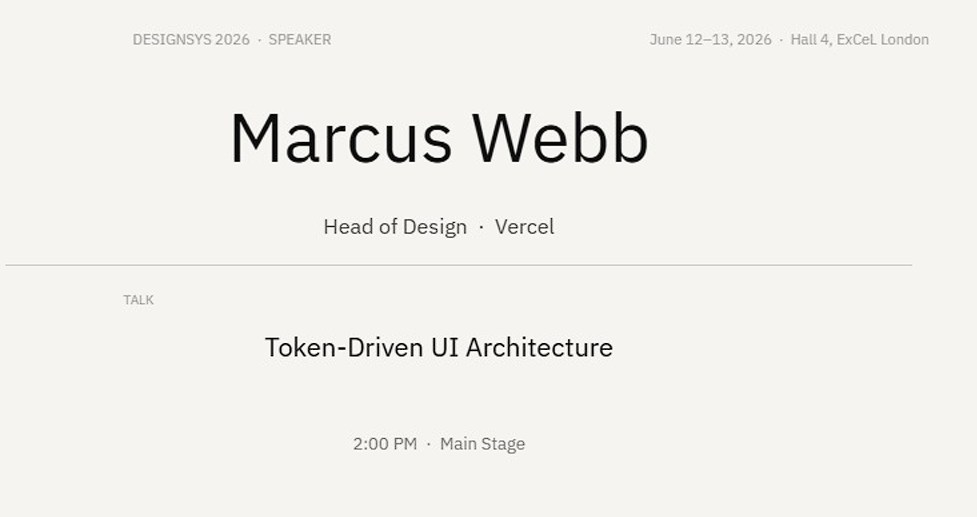
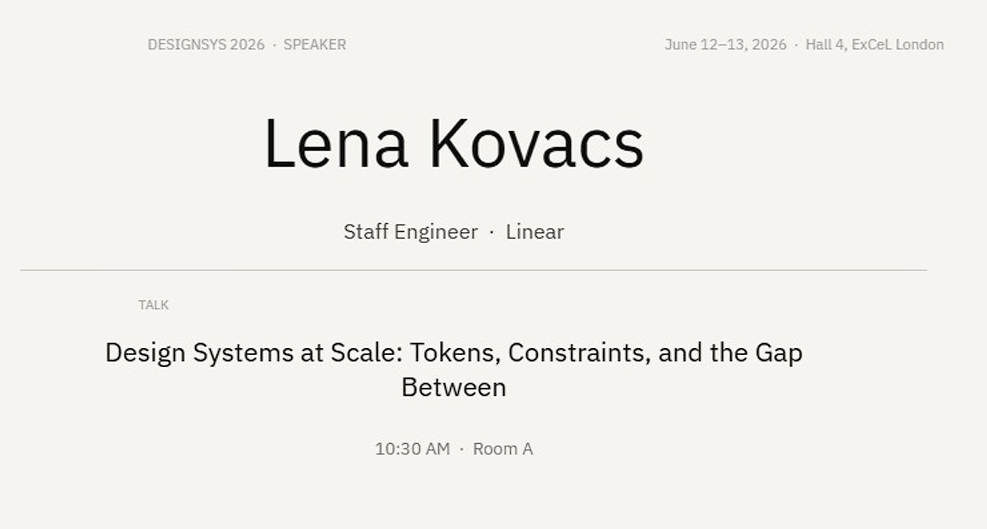
This is the structure you want for dynamic image generation or batch rendering: start from a base JSON template, apply deterministic transformations, validate, render per record, and keep failures actionable.
In Polotno, store.toJSON() and store.loadJSON() are core primitives for this workflow. For building a real template library (saving JSON + generating previews), check-out Polotno template library.
const renderDataset = async ({ store, dataset, tokens }) => {
  const expectedRequiredIds = ['accent-bar', 'event-label', 'event-meta'];

  // 1) Get the base template from the editor.
  const authored = store.toJSON();

  // 2) Normalize styling via tokens.
  const baseTemplate = applyTokens(authored, tokens);

  // 3) Validate base template once.
  const baseErrors = validateTemplate({ template: baseTemplate, expectedRequiredIds });
  if (baseErrors.length) {
    throw new Error(`Template validation failed: ${JSON.stringify(baseErrors)}`);
  }

  // 4) Render per record.
  for (const record of dataset) {
    const merged = replaceVariables(baseTemplate, record);

    const errors = validateTemplate({ template: merged, expectedRequiredIds });
    if (errors.length) {
      // In production: write to a manifest, quarantine the record, keep the job moving.
      console.warn('Skipping record due to validation errors:', {
        recordId: record.id,
        errors,
      });
      continue;
    }

    await store.loadJSON(merged);

    // Ensure assets/fonts are loaded before export.
    await store.waitLoading();

    // Export depending on your product: image, PDF, video, etc.
    // See PDF export docs: https://polotno.com/docs/pdf-export
    await store.saveAsPDF({ fileName: `${record.id || 'output'}.pdf` });
  }

  // Optional: restore authored base state in the editor UI.
  await store.loadJSON(authored);
};
Core concepts you should define once
Developers usually struggle with brand locking because the same words are used to describe different things. Define these concepts once and use them consistently.
Template author vs end user
Template authors control structure and constraints. End users operate inside those constraints. This is the difference between a design tool and a template system.
Locked layer vs editable region
Locked layers protect identity and compliance content such as logos, backgrounds, and disclaimers. Editable regions expose controlled inputs such as headline fields, product descriptions, or image placeholders.
If this separation is not explicit in your schema, it will not be enforceable.
Constraints vs validation
Constraints are the UX layer. They prevent many invalid actions before they happen.
Validation is the enforcement layer. It guarantees that the state you save or render is still valid, even if the UI is bypassed through edge cases, imports, or API calls.
Tokens
Tokens replace free-form styling with named, controlled choices. This is what prevents brand drift and enables centralized updates.
Policy
Policy is what lets you scale constraints across tenants and roles. A policy typically defines permissions, allowed tokens, required elements, and validation rules.
Threat model: what breaks without constraints
Without enforced constraints, users do not just make minor mistakes. They push the system into invalid states that show up later, when it is expensive to fix.
The most common failures are text overflow and clipping, unapproved fonts and colors, low-quality images that become unusable in print, missing legal copy, and preview and export mismatches caused by inconsistent rendering rules.
The value of brand locking is that it makes invalid states unrepresentable in the UI and un-saveable in validation.
Constraint types and how they map to enforcement
A scalable system needs a consistent taxonomy. Each constraint type must map to:
- A UI affordance (what the user can do in the editor)
- A persisted policy (what the template schema declares)
- A validation rule (what must be rejected)
If those layers disagree, the system becomes brittle.
Absolute locks
Absolute locks are for elements that must not change because they define identity, compliance, or structural layout.
In practice, “locked” should mean the element cannot be moved, resized, deleted, rotated, or restyled, and validation should treat locked elements as required where appropriate.
Bounded transforms
Bounded transforms are for elements that users can interact with, but only inside safe boundaries. This is common for image placeholders and modules that need limited flexibility.
In an embedded design editor, bounded transforms are usually implemented by constraining x and y ranges, min and max width and height, and optional aspect ratio rules.
Editable text fields
Most templates fail because of text, not because of images. Editable text fields should be editable by default, but bounded so the template remains readable and printable.
Field-level constraints typically include max characters, maximum lines, and minimum readable font size.
Style constraints
Style constraints prevent brand drift. The simplest approach is to remove arbitrary styling controls and only allow tokens and variants.
If a change can create an off-brand output without obviously breaking layout, it still needs constraint coverage.
Image constraints
Images introduce brand and production risks. Even if layout stays intact, low-quality assets create unusable outputs in print.
Validate images as early as possible, ideally on upload. If you wait until export, users have already built designs around invalid assets.
Component constraints
Components scale template systems by abstracting complexity into reusable blocks with defined customization points.
Instead of exposing many primitive elements that users can edit freely, you expose a smaller set of components with a contract. This reduces the number of rules you need and makes multi-template consistency easier.
Role-based editing model
Role-based editing scales governance by separating responsibilities:
- Template authors design structure and constraints.
- Reviewers verify compliance and production safety.
- Publishers control which versions are usable in production.
- End users personalize within the safe editing surface.
Roles should change permissions, not change physics. The same validation and rendering rules must apply regardless of who initiated the change.
Where to enforce constraints
A robust system enforces rules in multiple places because each place covers different failure modes.
In-editor UI
The editor UI is where you prevent most invalid actions and reduce user confusion. It should disable actions users cannot take and communicate editability clearly.
UI is prevention, not enforcement.
Save-time validation
Save-time validation is the first hard gate. It ensures you never persist a template state that will later fail at export.
This is the place to reject missing required elements, bounds violations, disallowed style overrides, and invalid assets.
Render-time validation
Render-time validation is the final safety net. It matters because users can bypass UI restrictions through imports, API edits, or edge cases.
In batch rendering, “failed fast with a good error” is more useful than “rendered something wrong.”
Audit logs
Audit logs make governance real and debugging possible. At minimum, capture who changed what, when it changed, which template version and policy was in effect, and which validation rules failed.
Handling text (the hardest part)
Text is the least predictable input because it varies by length, language, and user behavior. Most templates fail because of text, not images.
A practical policy per field is:
- Wrap first to preserve meaning.
- Shrink only within strict limits to maintain hierarchy.
- Truncate as a last resort to protect layout.
For print workflows, include readability constraints. A template that “fits” but produces 6pt text is still a failure.
Two production practices that help:
- Maintain an edge-case dataset (long names, long addresses, non-Latin scripts) and run it on every template change.
- Validate after substitution per record, and quarantine failures rather than halting the entire job.
Governance workflow
At scale, templates need lifecycle stages so changes are controlled. A typical workflow is draft, review, approved, and published.
Publishing should pin an immutable template version so rendering stays deterministic. Changes should create new versions rather than mutating history. This enables reproducible rerenders and safe rollbacks.
QA and proofing
Manual QA does not scale. Embed automated checks into save and render workflows, then use proofing and sampling to validate output quality.
A practical proofing model for bulk output is:
- Proof the first 10 to 20 records.
- Proof edge-case buckets.
- Proof a small random sample (1 to 2 percent).
Proofing must be a production gate. If proofing cannot block rendering, it is just screenshots.
Common failure modes and fixes
Users still break layouts
This is usually caused by UI-only constraints. Add save-time validation and reject invalid states before persistence. In bulk pipelines, include record-level errors so you can skip or quarantine failures.
Low-resolution images in print exports
Validate assets at upload time with minimum pixel dimensions and clear error messages. Do not wait until export.
Brand colors drift
Use tokens only and remove free-form styling controls. Validate token usage at save time.
Preview does not match export
Align font loading, layout logic, and rendering rules between preview and export. If preview and export use different systems, treat the export engine as the source of truth and test preview against it.
Users bypass UI restrictions
Always validate at save time and render time. Treat UI as guidance, not enforcement.
FAQ
How do I let users edit text without breaking the layout?
Create explicit editable text fields and enforce per-field constraints like max characters, max lines, and minimum readable font size. After substitution, validate the final layout again immediately before rendering.
How do I lock fonts and colors to brand standards?
Replace arbitrary styling controls with tokens. Apply tokens deterministically before saving and before rendering, and disallow per-node overrides.
How do I prevent low-quality images in print exports?
Validate assets at upload time with minimum pixel dimensions. If you wait until export, users will build designs around invalid assets.
How do I support approvals for template changes?
Use a template lifecycle with review and publish stages, and make published versions immutable.
How do I enforce constraints consistently across editor and server-side rendering?
Use a shared policy model and run the same validations in the editor, on save, and immediately before render.
Glossary
- Brand locking: Enforcing rules in a template system so end users can personalize content without breaking layout, compliance, or brand styling.
- Template system: A workflow where an authored base design is reused, filled with data, and exported repeatedly (often at scale).
- Policy: The contract that defines edit permissions, required elements, allowed styling, and validation rules.
- Editability: A node-level rule describing what a user is allowed to change.
- locked: No changes allowed (position, size, rotation, styling, deletion).
- contentOnly: Text or media content can change, but geometry and styling are fixed.
- bounded: User edits are allowed only inside defined constraints (for example, resizing an image within a placeholder).
- Required node: An element that must exist in all saved states and all renders.
- Token (brand token): A named preset (typography, color) used instead of free-form styling.
- Determinism: The property that the same template version plus the same input data produces the same exported output.
- Save-time validation: Validation performed when saving a template or a filled design state, to prevent persisting invalid states.
- Render-time validation: Validation performed immediately before export, to catch invalid states introduced via imports, API writes, or edge cases.
- VDP (variable data printing): Generating many variants of a design by combining one template with many data records.
- Polotno store: The in-memory model that holds pages and elements; you serialize and load designs with
store.toJSON()andstore.loadJSON().




