
Building a high-scale direct mail automation pipeline (CRM segment → personalized postcard → delivery)
Direct mail automation is a data pipeline that ends in a physical system. Your inputs are customer records. Your outputs are print artifacts (PDFs or print-ready packages) plus a manifest that binds every output file back to a recipient record, a template version, and a tracking code.
If you are building a SaaS product that embeds an editor into a workflow, this is where Polotno SDK typically fits: the template and composition layer. Polotno is an embedded design editor (canvas SDK) that lets your users build templates inside your app, store them as JSON, and feed them into your rendering service for dynamic image generation and PDF output. Polotno's import/export model is JSON-first, which makes it straightforward to version templates and generate variations programmatically. See Polotno's Import and Export docs and the JSON schema.
What "direct mail automation" means
Direct mail automation is the systematic conversion of digital triggers or batch queries into physical mailpieces without requiring humans to manually prepare design files or hand off PDFs by email.
In practice, automation covers the stages that are most likely to fail at scale:
- Data extraction (snapshot your segment)
- Data cleaning and normalization (addresses, suppression)
- Template binding (inject per-recipient data into a design)
- Proofing (edge-case sampling and approvals)
- Rendering (deterministic batch output)
- Printer handoff (spec validation + manifest packaging)
- Tracking and attribution (QR codes, redirects, delivery events)
The parts that usually stay manual are the ones that benefit from human judgment: creative strategy, initial template design, selecting paper and finishes, and the final sign-off gate.
When direct mail automation is worth it
Building the pipeline has fixed cost. You pay for data plumbing, template infrastructure, rendering compute, printer integrations, and ongoing operational QA. It becomes worth it when you can amortize that cost over repeated, high-volume runs.
These are practical engineering signals, not "marketing maturity" indicators.
| Signal | Why it matters |
|---|---|
| Volume 1,000 pieces/run | Manual production becomes cost-prohibitive at this scale. Automation reduces per-piece ops work and error rate. |
| Personalization 3 variables | More than name + offer code pushes you into programmatic template binding and overflow controls. |
| Repeating cadence | Monthly and triggered sends (abandoned cart, onboarding milestones) benefit from a pipeline you can rerun deterministically. |
| Segment count 5 | Segment-specific offer logic and artwork variants become inconsistent if managed by hand. |
| Attribution required | Measuring response requires embedded tracking codes, a redirect service, and durable event logs. |
Rule of thumb: if you will run the same campaign shape more than twice, build the pipeline. The third run should require zero human data handling.
Core concepts (define once)
Many teams fail because they treat this as "generate a PDF." The terms below exist to turn direct mail into a reproducible system.
- Segment: A filtered recipient set that drives offer logic and template variants.
- Suppression list / opt-out: A source of truth for recipients that must not receive mail.
- Address normalization: Parsing and standardizing addresses into a deliverable format (for the US this often means CASS/DPV; other regions have equivalents).
- Offer logic: The mapping from segment membership to specific offer copy, CTA, expiry, and conditional artwork.
- Print-ready specs: Page size, bleed, DPI, fonts, and color space requirements defined by the printer.
- Manifest: The contract that binds record → output file → tracking code → template version.
- Tracking code: An opaque identifier encoded in QR/URL that resolves server-side. It must not contain PII.
Data sources and extraction
Where the recipient data comes from
Direct mail pipelines usually pull from:
- A CRM (contacts, lifecycle stage, do-not-mail flags)
- A CDP (events, cohorts, product affinity)
- A warehouse (aggregates: LTV, RFM scoring)
- A marketing database (campaign history and suppression state)
The key engineering decision is whether you are extracting "live" or taking a snapshot.
Snapshot vs live queries (always snapshot)
Do not query live during rendering. Render from a point-in-time snapshot so you can rerun, audit, and reproduce any prior job.
The SQL dialect does not matter. The invariant matters: one immutable dataset per run.
CREATE TABLE dm_run_20240315_snapshot AS
SELECT
	c.customer_id,
	c.first_name,
	c.last_name,
	c.address_line1,
	c.address_line2,
	c.city,
	c.state,
	c.zip,
	c.email,
	s.segment_code,
	s.ltv_tier,
	s.last_purchase_date,
	s.preferred_category
FROM customers c
JOIN customer_segments s ON c.customer_id = s.customer_id
WHERE s.mail_eligible = TRUE
	AND c.country = 'US'
	AND c.do_not_mail = FALSE;
Canonical input schema
Downstream stages depend on a stable schema. Define it once, validate it on ingestion, and version it.
{
	"customer_id": "string | required | unique",
	"first_name": "string | required",
	"last_name": "string | required",
	"address_line1": "string | required",
	"address_line2": "string | nullable",
	"city": "string | required",
	"state": "string(2) | required",
	"zip": "string | required | 5 or 9 digit",
	"email": "string | nullable",
	"segment_code": "enum | required | GOLD|SILVER|BRONZE|LAPSED",
	"ltv_tier": "integer | required | 1–4",
	"last_purchase_date": "date | nullable | ISO-8601",
	"preferred_category": "string | nullable"
}
Data cleaning and normalization (the unsexy core)
In direct mail automation, data quality is not "nice to have." Bad data becomes real cost: returned pieces, reprints, missed cutoffs, and broken attribution.
Normalization is a series of deterministic transforms that converts "CRM export strings" into "printable, auditable fields." The goal is reproducibility: given the same snapshot, you produce the same normalized output and the same set of suppression decisions.
Realistic raw input (CSV)
This is typical of a CRM export: inconsistent casing, inconsistent state formats, missing ZIPs, and duplicated address_line2.
customer_id,first_name,last_name,address_line1,address_line2,city,state,zip,email,segment_code
C10042,Jennifer,Walsh,123 Main st,,springfield,il,62701,jen@example.com,GOLD
C10043,ROBERT,NGUYEN,456 oak avenue apt 2b,Apt 2B,Chicago,Illinois,60614,rob@example.com,SILVER
C10044,Maria,Santos,789 Pine Blvd,Suite 100,New york,ny,10001,,BRONZE
C10045,james,kim,321 elm street,,los angeles,CA,90210-1234,james@example.com,GOLD
C10046,Sarah,O'Brien,654 Maple Dr,,Boston,MA,02101,sarah@example.com,LAPSED
C10047,David,Chen,987 Cedar Lane Apt 3,,San Francisco,ca,94105,david@example.com,GOLD
C10048,Lisa,Thompson,1010 Birch St,,Austin,TX,,lisa@example.com,SILVER
Suppression lists and compliance gates
Apply suppression immediately after extraction, before you spend money on address validation and rendering.
Suppression matching is rarely a single key. In practice you match on a combination of customer_id, email, and an address hash. Keep suppression centralized, versioned, and logged.
{
	"emails": ["optout@example.com", "noreply@domain.com"],
	"address_hashes": ["a3f4c8b1d9e2...", "9d2f1a7e3c0b..."],
	"customer_ids": ["C10046", "C10099"],
	"zip_exclusions": ["90210", "10002"],
	"litigation_hold": ["C10051", "C10088"]
}
Address normalization (before and after)
Treat address normalization like a build step: it needs reason codes, logs, and a way to re-run without changing behavior.
Input:
123 mapel ave #2, S.F, CA 94105
Output:
123 MAPLE AVE APT 2, SAN FRANCISCO, CA 94105-2201
If an address is unresolvable, do not print "best effort." Route it to an error queue, record a reason code, and measure your failure rate.
| Customer ID | Raw input | Normalized output |
|---|---|---|
| C10042 | 123 Main st, springfield, il 62701 | 123 MAIN ST, SPRINGFIELD IL 62701-3201 |
| C10043 | 456 oak avenue apt 2b, Chicago, Illinois 60614 | 456 OAK AVE APT 2B, CHICAGO IL 60614-2847 |
| C10044 | 789 Pine Blvd Suite 100, New york, ny 10001 | 789 PINE BLVD STE 100, NEW YORK NY 10001-1234 |
| C10045 | 321 elm street, los angeles, CA 90210-1234 | 321 ELM ST, LOS ANGELES CA 90210-1234 |
| C10047 | 987 Cedar Lane Apt 3, San Francisco, ca 94105 | 987 CEDAR LN APT 3, SAN FRANCISCO CA 94105-3318 |
| C10048 | 1010 Birch St, Austin, TX (missing zip) | ⚠ UNRESOLVABLE: route to error queue |
Deduplication (do it after normalization)
Deduplicate on normalized fields (or an address hash), not raw strings. Otherwise "123 Main st" and "123 MAIN STREET" do not match and you double-send.
Pick a deterministic policy for duplicates and document it. A common policy is "keep the highest LTV recipient for a shared address."
SELECT DISTINCT ON (normalized_address, zip5)
	customer_id,
	first_name,
	normalized_address,
	zip5
FROM normalized_recipients
ORDER BY normalized_address, zip5, ltv_tier DESC;
Missing data handling (make it explicit)
Catch missing data in schema validation, upstream of the template.
- Missing
first_name: substitute a safe default likeValued customerso template binding does not crash. - Missing
preferred_category: fill from a segment default so conditional blocks are consistent. - Missing
last_purchase_date: use NULL, not an empty string. - Missing ZIP: route to an error queue and do not print. Log
ADDR_INCOMPLETE.
Template strategy (designing for personalization)
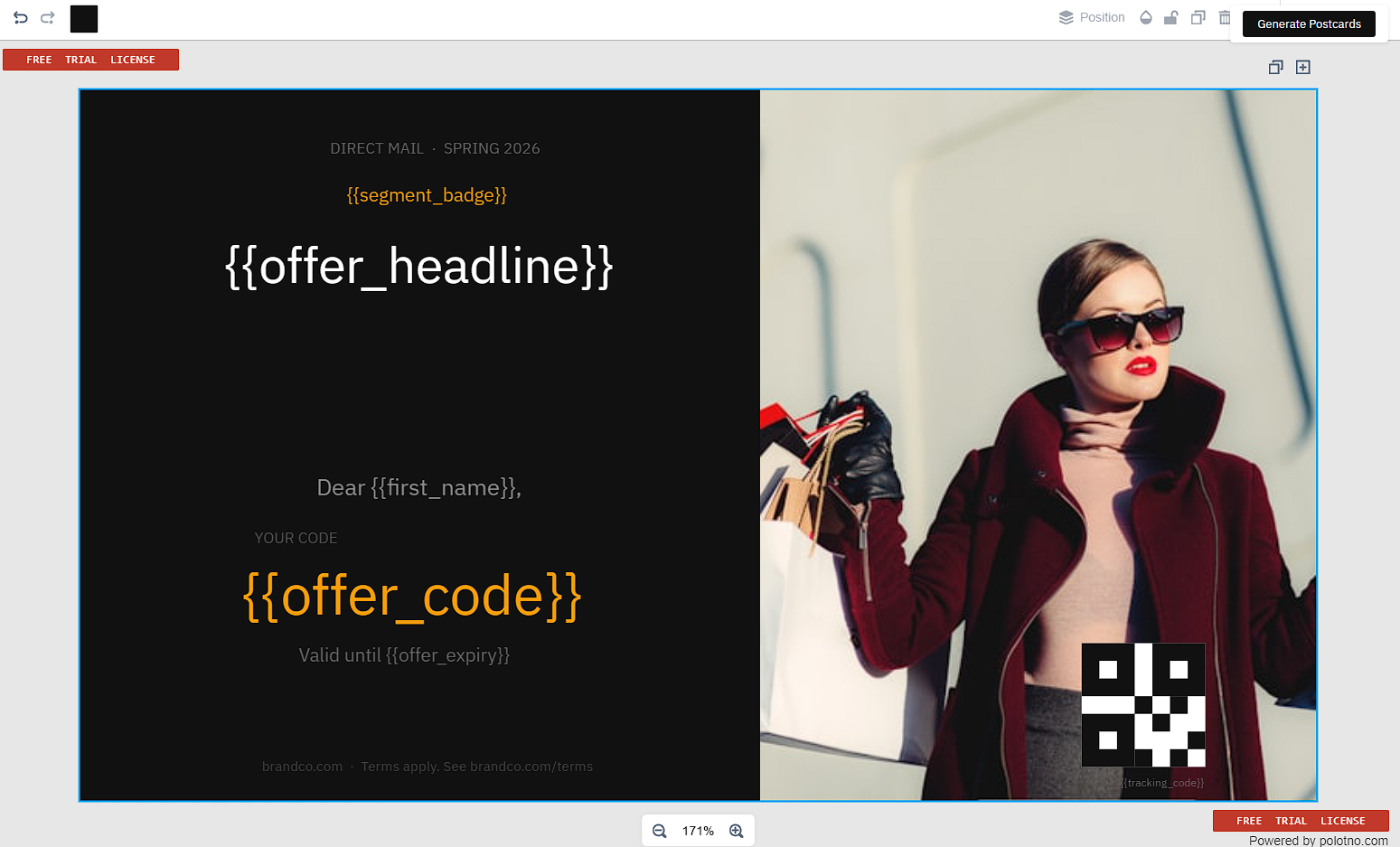
A direct mail template is a base layout plus a controlled set of binding zones. The base layout contains static artwork, brand elements, and legal copy. Binding zones are the contract between data and design.
For a SaaS team, this is exactly where an embedded design editor makes the product usable. You want non-engineers to edit templates, but you need the resulting design to remain render-safe under variable data.
Polotno SDK fits as the editor layer: you embed a design editor in SaaS, let users design templates on a canvas, save templates as JSON, and then render them programmatically from your backend. Many teams also ship a templates library UX so users can start from a preset instead of a blank canvas. See Polotno's Templates library.
Template as JSON (Polotno-style)
Storing templates as JSON is what makes programmatic design tools real. It allows you to:
- Version and diff templates (like code)
- Validate constraints before a run (bounding boxes, minimum QR size)
- Render deterministically from a headless service
Below is a postcard template in Polotno's design schema, trimmed to the fields the pipeline cares about. Polotno stores the custom object on every element and never interprets it, so it carries your variable bindings, overflow policy and QR settings; your pipeline reads them and swaps in the rendered QR image before export.
{
	"width": 1872,
	"height": 1296,
	"pages": [
		{
			"id": "front",
			"bleed": 36,
			"children": [
				{
					"type": "image",
					"id": "bg_hero",
					"src": "https://assets.example.com/hero_bg.png",
					"x": 0,
					"y": 0,
					"width": 1872,
					"height": 1296
				},
				{
					"type": "text",
					"id": "headline",
					"text": "{{offer_headline}}",
					"fontFamily": "Gotham",
					"fontWeight": "bold",
					"fontSize": 72,
					"fill": "#FFFFFF",
					"x": 108,
					"y": 180,
					"width": 900,
					"height": 240,
					"custom": { "variable": "offer_headline", "overflow": "error" }
				},
				{
					"type": "text",
					"id": "recipient_name",
					"text": "{{recipient_name}}",
					"fontFamily": "Gotham",
					"fontSize": 48,
					"fill": "#FFFFFF",
					"x": 108,
					"y": 420,
					"width": 900,
					"height": 120,
					"custom": { "variable": "recipient_name", "overflow": "truncate" }
				},
				{
					"type": "image",
					"id": "tracking_qr",
					"src": "https://assets.example.com/qr-placeholder.png",
					"x": 1600,
					"y": 900,
					"width": 180,
					"height": 180,
					"custom": { "variable": "tracking_url", "isMachineCode": true, "errorCorrection": "H" }
				}
			]
		}
	]
}
Overflow policy (make it a first-class control)
Overflow is one of the highest-frequency failure modes in production runs. Define an overflow policy for every variable zone.
Choose policies based on business risk.
| Policy | Behavior |
|---|---|
| error | Stop rendering for this recipient and route to an error queue. Use for offer copy and legal text. |
| truncate | Cut at the boundary. Use for names where partial display is acceptable. |
| shrink | Reduce font size until it fits, down to a minimum. Only safe if you control font licensing and readability. |
| wrap | Wrap within a bounded height. Good for multi-line fields if you design the zone for it. |
Offer logic and conditional variants
Assign offers before rendering so you can proof the assignments. Think of this as compilation: it produces concrete fields that templates bind to.
{
	"GOLD": { "headline": "Exclusive Gold Member Offer: 30% Off", "cta": "GOLD30", "expiry_days": 30 },
	"SILVER": { "headline": "Silver Member Special: 20% Off", "cta": "SILVER20", "expiry_days": 21 },
	"BRONZE": { "headline": "Welcome Back! 15% Off Your Next Order", "cta": "BRONZE15", "expiry_days": 14 },
	"LAPSED": { "headline": "We Miss You – 25% Off to Come Back", "cta": "WINBACK25", "expiry_days": 21 },
	"_default": { "headline": "Special Member Offer Just For You", "cta": "MEMBER10", "expiry_days": 14 }
}
Here is a deterministic assignment function that generates template-ready fields.
from __future__ import annotations

from datetime import date, timedelta

def assign_offer(recipient: dict, offer_map: dict, *, run_date: date) -> dict:
	segment = recipient.get("segment_code") or "_default"
	offer = offer_map.get(segment, offer_map["_default"])

	expiry = run_date + timedelta(days=int(offer["expiry_days"]))

	return {
		**recipient,
		"offer_headline": offer["headline"],
		"offer_code": offer["cta"],
		"offer_expiry": expiry.isoformat(),
		"offer_variant": segment,
		"recipient_name": f"{recipient.get('first_name','').strip()} {recipient.get('last_name','').strip()}".strip(),
	}
Proofing workflow (before the full run)
Proofing is the gate that prevents expensive physical mistakes. You cannot roll back printed postcards.
A good proof set is designed to cover failure modes, not random recipients. It should include segment variants, longest-field records, null-field cases, and any record that exercises conditional blocks.
A practical proof set:
- One proof per segment (validates conditional offer logic and artwork)
- Longest and shortest values for critical fields (name, headline)
- At least one record with
address_line2 = null - At least one record that exercises every conditional block
- A small random sample per segment for statistical QA
Implement proof approval as a hard gate in your orchestration system.
def proof_approval_gate(db, run_id: str) -> None:
	row = db.query_one(
		"SELECT approved_by, approved_at FROM proof_approvals WHERE run_id = %s",
		[run_id],
	)
	if not row:
		raise RuntimeError(f"Run {run_id}: proof not approved. Halting batch render.")
Rendering and packaging
At scale, rendering is a distributed batch job. The output must be deterministic: same input snapshot and same template version should produce identical artifacts.
Two rules make the system operable:
- Generate the manifest before rendering.
- Treat assets (fonts, images) like build dependencies and pin versions.
Render manifest (the contract)
The manifest binds run_id, template checksum, per-recipient output filename, and tracking metadata. It becomes the source of truth for QA, partial reruns, and audit.
{
	"run_id": "dm-20240315-postcards-6x4",
	"created_at": "2024-03-15T09:00:00Z",
	"template_id": "postcard-6x4-v3",
	"template_checksum": "sha256:a3f4c8b1...",
	"total_recipients": 9847,
	"records": [
		{
			"seq": 1,
			"customer_id": "C10042",
			"segment_code": "GOLD",
			"offer_variant": "GOLD",
			"ab_variant": "A",
			"tracking_code": "20240315-C10042-A",
			"tracking_url": "https://go.brand.com/r/20240315-C10042-A",
			"output_filename": "dm-20240315-0000001-C10042.pdf",
			"render_status": "pending"
		}
	]
}

File naming (make it sortable and provenance-safe)
File names should be sortable, contain no spaces, and encode provenance.
- Per-recipient file:
{run_id}-{seq_padded}-{customer_id}.pdf - Optional merged print file:
{run_id}-MERGED-PRINT-READY.pdf - Optional segment batches:
{run_id}-SEG-{segment}-001-of-003.pdf
Example: rendering Polotno templates from a backend service
In a typical Polotno SDK integration, your SaaS stores templates as JSON. Your backend loads the JSON and renders artifacts for each recipient record.
If you do not want to run rendering infrastructure yourself, Polotno provides a managed option that is designed for bulk workflows: the Cloud Render API. It renders outputs from Polotno JSON in the cloud and is a common fit for high-volume campaigns.
If you do want full control (data residency, custom infra), Polotno also documents server-side generation patterns in Server-side image generation with Node.js.
The pipeline shape is stable:
- Load template JSON by template_id and verify checksum.
- Load the run snapshot (or normalized output) as records.
- Generate a manifest with tracking URLs.
- Render and update render_status.
type RunRecord = {
	seq: number;
	customer_id: string;
	offer_headline: string;
	recipient_name: string;
	tracking_url: string;
	output_filename: string;
};

type RenderJob = {
	run_id: string;
	template_id: string;
	template_json: unknown;
	records: RunRecord[];
};

export async function renderDirectMailRun(job: RenderJob) {
	assertTemplateIsPinned(job.template_id, job.template_json);

	for (const batch of chunk(job.records, 200)) {
		const results = await Promise.allSettled(
			batch.map((r) => renderSingle(job.template_json, r, r.output_filename))
		);

		await persistBatchResults(job.run_id, batch, results);
	}
}
Printer handoff (what printers actually need)
Printers do not want "a PDF." They want a package that matches their spec sheet and a manifest that tells them what they are printing.
A real printer handoff typically includes:
- A print specification sheet (size, bleed, DPI, color space, font embedding rules)
- The rendered PDFs (per-recipient or merged, depending on vendor)
- A companion manifest (often CSV) referencing file names and quantities
- An upload mechanism (SFTP, bucket drop, or a vendor API)
Pre-submission validation (preflight)
Run automated checks on every rendered file before submission. Vendors may reject your job or print it incorrectly.
def validate_pdf_spec(meta: dict, spec: dict) -> list[str]:
	errors: list[str] = []

	if meta["width_inches"] != spec["document_size_with_bleed"]["width"]:
		errors.append(
			f"Width mismatch: got {meta['width_inches']}, expected {spec['document_size_with_bleed']['width']}"
		)

	if meta["dpi"] < spec["resolution_dpi"]:
		errors.append(f"DPI too low: got {meta['dpi']}, minimum {spec['resolution_dpi']}")

	if meta["colorspace"] != spec["color_space"]:
		errors.append(
			f"Wrong colorspace: got {meta['colorspace']}, expected {spec['color_space']}"
		)

	if not meta.get("fonts_embedded", False):
		errors.append("Fonts not fully embedded")

	if meta["ink_density_max"] > spec["max_ink_density_pct"]:
		errors.append(
			f"Ink density {meta['ink_density_max']}% exceeds {spec['max_ink_density_pct']}%"
		)

	return errors
PDF export details
If you are exporting print-ready PDFs from Polotno templates, use Polotno's PDF export guidance to handle bleed areas, crop marks, and the right output mode for your hosting model.
Cutoff rules (operational reality)
Print vendors have hard daily cutoffs, often around 17:00 local time. If your render finishes at 16:45 and preflight takes 20 minutes, you miss the cutoff and ship a day later.
Build buffer into the schedule and treat cutoff like a deployment window.
Tracking and measurement
Tracking is where many direct mail systems accidentally leak PII. The safest pattern is:
- Generate an opaque tracking code per recipient.
- Encode a short tracking URL in the QR code.
- Resolve the code server-side and log the hit against internal identifiers.
Tracking code generation (before rendering)
Generate codes before rendering so they can be stored in the manifest and your tracking database.
def generate_tracking_code(*, run_date: str, customer_id: str, ab_variant: str) -> str:
	# Example format: 20240315-C10042-A
	return f"{run_date}-{customer_id}-{ab_variant}"
Keep tracking URLs short. QR codes fail when the payload is long or when the print zone is too small for your DPI.
Redirect resolution (no PII in URLs)
The redirect service should log the event internally and then redirect to the destination URL.
app.get('/r/:code', async (req, res) => {
	const code = req.params.code;

	const record = await db.query(
		'SELECT customer_id, destination_url, campaign_id FROM tracking_codes WHERE code = $1',
		[code]
	);

	if (!record) return res.status(404).send('Not found');

	await analytics.track({
		event: 'direct_mail_response',
		campaign_id: record.campaign_id,
		customer_id: record.customer_id,
		timestamp: new Date().toISOString(),
		channel: 'direct_mail'
	});

	res.redirect(302, record.destination_url);
});
Operational controls (stop conditions, partial reruns, rollback)
Treat a run like a production deployment. You need circuit breakers and a way to rerun only failures.
Stop conditions
Stop conditions prevent silent failure.
const STOP_CONDITIONS = {
	address_validation_failure_rate: 0.05,
	render_error_rate: 0.02,
	pdf_spec_failure_rate: 0.01,
	suppression_match_rate: 0.30
};
Tune thresholds per business. The important part is that they exist and they halt the pipeline without relying on humans noticing.
Partial reruns
If your manifest records render_status, you can re-render only failures after fixing the root cause. This is one of the main reasons to generate the manifest first.
Rollback
If a job has been submitted but has not entered production, you may have a short cancellation window through the vendor API. After production begins, there is no rollback. The only fix is a corrective mailing. Store run_id and vendor_job_id together so you can act quickly.
Failure modes (what actually breaks)
These are the failures you will see in production. In almost every case, the mitigation is "add a control earlier in the pipeline."
| Failure mode | Root cause | Mitigation |
|---|---|---|
| Bad addresses / returns | Validation passed, but delivery fails (vacant, moved, unknown). | Log returns. Update suppression. Feed back into CRM contact data QA. |
| Text overflow | Variable data exceeds bounding boxes and either clips or fails render. | Enforce overflow policies. Proof the longest values. Use error policy for critical text. |
| Missing or unembedded fonts | Font dependencies are not pinned or embedding fails. | Version pin fonts and validate embedding in preflight. |
| QR code failures | Payload too long, zone too small, DPI too low, or redirect service down. | Short URLs. Minimum physical size. Monitor redirect uptime. |
| Wrong bleed / trim | Output page size does not match the spec sheet. | Automate bleed validation. Generate specs from vendor JSON, not memory. |
| Colorspace mismatch (RGB vs CMYK) | Vendor converts internally with unpredictable results. | Require CMYK export and validate in preflight. |
| Duplicate records | Dedup happens on raw strings before normalization. | Dedup after normalization using an address hash. |
Compliance and data governance
Suppression list management
A suppression list belongs in a centralized, versioned dataset with controlled write access. Log every suppression decision (who, why, when). You will need it for audits and debugging.
Opt-out handling
Opt-outs must be honored. Accept them across channels (web response, phone request, written request) and apply them within the legally required time window for the jurisdiction.
Data retention
Run snapshots and manifests contain PII. Retain them only as long as your policy allows, and delete them when the retention window ends. Keep aggregate metrics without PII for longer-term analysis.
FAQ
How do I generate and mail 10,000 personalized postcards automatically?
Snapshot the segment, normalize and suppress recipients, generate the manifest, render in parallel batches, run preflight validation, package outputs with the manifest, and submit to a printer via SFTP or API. At this scale, proofing and preflight are the difference between a clean run and an expensive reprint.
How do I ensure addresses are valid before printing?
Use an address validation and normalization service appropriate to the region. For US mail, that typically means a CASS-certified provider and a DPV confirmation flag. Do not print addresses that fail validation. Route them to an error queue and measure the failure rate.
How do I proof at scale without reviewing every postcard?
Generate the manifest first and sample edge cases: one per segment, longest field values, null-field records, and a small random sample per segment. Render only those proofs. Approve the proof set before batch rendering.
What's the best packaging format for printers (merged vs per-recipient)?
Many vendors prefer one PDF per mailpiece plus a companion manifest. Some accept a merged PDF. Follow the vendor spec. Whatever you choose, keep file naming deterministic and keep the manifest at the root of the package.
How do I handle opt-outs and suppression lists?
Centralize suppression, version it, apply it early in the pipeline, and log every suppression decision with a reason code. Treat suppression as a compliance control with the audit trail that implies.
Glossary
- A/B variant: A deterministic label (A, B, etc.) assigned to a recipient so creative or offer differences can be measured.
- Address normalization: Converting raw address strings into a standardized deliverable form (CASS/DPV in the US, or local equivalents elsewhere).
- Bleed: Extra printed area beyond the final trim size so small alignment shifts do not create white edges.
- CASS / DPV: US postal validation standards and checks used to improve deliverability and catch invalid addresses.
- Cutoff time: The printer's daily submission deadline; missing it usually delays production by at least one business day.
- Deterministic rendering: A guarantee that the same input snapshot + same template version produces the same output artifacts.
- Embedded design editor: A design editor UI that runs inside your product (not as an external tool). Polotno SDK is used to embed a full canvas-based editor into a SaaS app.
- Error queue: A durable place to route records that fail validation (missing ZIP, overflow errors, unresolvable address) so they are not printed.
- Manifest: The run contract mapping each recipient record to output filename, template checksum/version, and tracking metadata.
- Overflow policy: The rule that controls what happens when text exceeds a bounding box (error, truncate, shrink, wrap).
- Preflight: Automated validation of rendered outputs against printer specs (page size, DPI, fonts embedded, color space).
- Print-ready PDF: A PDF that matches vendor requirements (size, bleed, crop marks, fonts, color space), suitable for production printing.
- Programmatic design: Generating or modifying designs via code from templates and data (often called dynamic image generation).
- QR payload: The URL or content encoded inside a QR code. It must be short enough to scan reliably at print DPI.
- Render gate: A hard approval step that blocks full batch rendering until proofs are approved.
- Suppression list: A versioned set of recipients that must not be mailed (opt-outs, litigation hold, internal addresses, undeliverables).
- Template JSON: A structured representation of a design. Polotno uses an open JSON format that you can export, store, modify, and re-import. See Import and Export.




